How to set your Lunar
Moonphase watch manual — watch the film, or follow the seven steps below.
Watch the video guide

01
The crown
The crown sits on the right side of the case. Always push it fully back in after setting: that keeps your watch running and water-resistant.
02
Two crown positions
The crown pulls out to two positions. Position 1 sets the moonphase and date; position 2 sets the time and day.

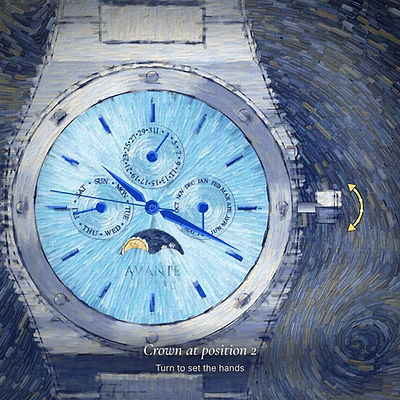
03
Set the time
Pull the crown out to position 2. Turn it up or down until the hands show the right time. Push the crown back in to start the watch.
04
Set the moonphase
Pull the crown out to position 1 and turn it upwards until the moon on the dial matches tonight's moon. Check the current phase on our Live Moonphase page. Then push the crown back in.


05
Set the date
Pull the crown out to position 1 and turn it downwards until the right date appears. Then push the crown back in.
06
Set the day
Pull the crown out to position 2 and turn it upwards. Each time the hands pass midnight, the day moves on by one. Repeat until the right day shows, set the time and push the crown back in.


07
Set the month
Above the crown sits a small recessed pusher. Press it with a small, blunt tool such as a toothpick. Each press moves the month on by one.
Good to know
Set the date, moonphase or month with the hands away from midnight: around 6:00 is safe. Between 9 pm and 12:30 am the calendar is changing, and a quick date change can fail.
Only press the month pusher when the date is not between the 26th and the 31st.
After a month with fewer than 31 days, move the date on by hand (crown position 1, turn it down).
The moon disc only turns forwards. Gone past tonight’s moon? Don’t turn back; keep turning until it comes round again.
Something feels stuck? Stop and contact us rather than forcing the crown or the pusher.
Your Lunar, set to tonight’s moon.
Something not working as described? Get in touch — we reply within 24 hours on working days.